Tutorial: Learning kernpy in 5 minutes.
This is a short introduction to kernpy. It will guide you through the main concepts and show you how to use the package in a few minutes.
When using kernpy, you should be familiar with the Humdrum **kern encodings. You can easily find information in:
Running the code
kernpy is able to be run as a normal snippet of code or as a module by command line interface.
We will import kernpy as the following way:
import kernpy as kp
What is Humdrum **kern?
First of all, let's see what a Humdrum **kern file looks like:
**kern  **text  **kern  **dynam **text
*clefG2 *   *clefG2 *   *
*M4/4   *   *   *   *
=1  =1  =1  =1  =1
4g  kern    4c  p   kern-
4f  kern    4d  <   -py
4g  kern    4e  (   mo-
4c  kern-   4f  (   -du-
.   .   .   [   .
=2  =2  =2  =2  =2
2c  -py 2g  f   -le
.   .   .   >   .
4B  kern    4f  )   is
4A  kern-   4d  )   the
=   =   =   =   =
1G  -py 1c  ]   best
==  ==  ==  ==  ==
*-  *-  *-  *-  *-
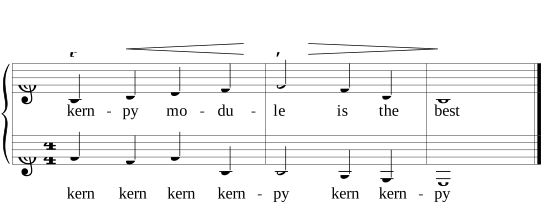
Let's code!
Basic Usage
Load a **kern/**mens file into a kp.Document.
import kernpy as kp

# Read a **kern file
document, errors = kp.load("path/to/file.krn")
Load a **kern/**mens from a string into a kp.Document.
import kernpy as kp

document, errors = kp.loads("**kern\n*clefC3\n*k[b-e-a-]\n*M3/4\n4e-\n4g\n4c\n=1\n4r\n2cc;\n==\n*-")
Create a new standardized file from a kp.Document.
import kernpy as kp

kp.dump(document, "newfile.krn")
Save the document in a string from a kp.Document.
import kernpy as kp

content = kp.dumps(document)
````

### Exploring different options when creating new files

Only use the specified spines in `spine_types`.
```python
import kernpy as kp

kp.dump(document, "newfile_core.krn",
        spine_types=['**kern'])
kp.dump(document, "newfile_lyrics.krn",
        spine_types=['**text])
kp.dump(document, "newfile_core_and_lyrics.krn",
        spine_types=['*+text'])
- Use
includefor selecting the kern semantic categories to use**. The output only contains what is passed. By default, all the categories are included.
import kernpy as kp

kp.dump(document, "newfile_only_clefs.krn",
        include={kp.TokenCategory.CLEF})
kp.dump(document, "newfile_only_durations_and_bounding_boxes.krn",
        include={kp.TokenCategory.DURATION, kp.TokenCategory.BOUNDING_BOXES})
- Use
excludefor selecting the kern semantic categories to not use**. The output contains everything except what is passed. By default, any category is excluded.
import kernpy as kp

kp.dump(document, "newfile_without_pitches.krn",
        exclude={kp.TokenCategory.PITCH})
kp.dump(document, "newfile_without_durations_or_rests.krn",
        exclude={kp.TokenCategory.BARLINES, kp.TokenCategory.REST})
- Use
includeandexcludetogether to select the kern semantic categories to use**. The output combines both.
import kernpy as kp

kp.dump(document, "newfile_custom.krn",
        include=kp.BEKERN_CATEGORIES,  # Preloaded set of simple categories
        exclude={kp.TokenCategory.PITCH})
- Use
encodingto select how the categories are split. By default, thenormalizedKernencoding is used.
import kernpy as kp

kp.dump(document, "newfile_normalized.krn",
        encoding=kp.Encoding.normalizedKern)  # Default encoding
Select the proper Humdrum **kern encoding:
kernpy provides different tokenizers to export the content each symbol in different formats.
| Encoding | Tokenized | Description |
|---|---|---|
| kern | 2.bb-_L | Traditional Humdrum **kern encoding |
| ekern | 2@.@bb@-·_·L | Extended Humdrum **kern encoding |
Use the Encoding enum class to select the encoding:
import kernpy as kp

doc, _ = kp.load('resource_dir/legacy/chor048.krn')

kern_content = kp.dumps(doc, encoding=kp.Encoding.normalizedKern)
ekern_content = kp.dumps(doc, encoding=kp.Encoding.eKern)
- Use
from_measureandto_measureto select the measures to export. By default, all the measures are exported.
import kernpy as kp

kp.dump(document, "newfile_1_to_10.krn",
        from_measure=1,  # First from measure 1
        to_measure=10)   # Last measure exported
- Use
spine_idsto select the spines to export. By default, all the spines are exported.
import kernpy as kp

kp.dump(document, "newfile_1_and_2.krn",
        spine_ids=[0, 1])  # Export only the first and the second spine
- Use
show_measure_numbersto select if the measure numbers are shown. By default, the measure numbers are shown.
import kernpy as kp

kp.dump(document, "newfile_no_measure_numbers.krn",
        show_measure_numbers=False)  # Do not show measure numbers
- Use all the options at the same time.
import kernpy as kp

kp.dump(document, "newfile.krn",
        spine_types=['**kern'],  # Export only the **kern spines
        include=kp.BEKERN_CATEGORIES,  # Token categories to include
        exclude={kp.TokenCategory.PITCH},  # Token categories to exclude
        encoding=kp.Encoding.eKern,  # Kern encoding
        from_measure=1,  # First from measure 1
        to_measure=10,  # Last measure exported
        spine_ids=[0, 1],  # Export only the first and the second spine
        show_measure_numbers=False,  # Do not show measure numbers
        )
Exploring kernpy utilities.
- Spines analysis Retrieve all the spine types of the document.
import kernpy as kp

kp.spine_types(document)
# ['**kern', '**kern', '**kern', '**kern', '**root', '**harm']

kp.spine_types(document, spine_types=None)
# ['**kern', '**kern', '**kern', '**kern', '**root', '**harm']

kp.spine_types(document, spine_types=['**kern'])
# ['**kern', '**kern', '**kern', '**kern']
- Get specific **kern spines.
import kernpy as kp

def how_many_instrumental_spines(document):
    print(kp.spine_types(document, ['**kern']))
    return len(kp.spine_types(document, ['**kern']))
# ['**kern', '**kern', '**kern', '**kern']
# 4

def has_voice(document):
    return len(kp.spine_types(document, ['**text'])) > 0
# True
How many measures are there in the document? Which measures do you want to export?
After reading the score into the Document object. You can get some useful data:
first_measure: int = document.get_first_measure()
last_measure: int = document.measures_count()
Iterate over all the measures of the document.
import kernpy as kp

doc, _ = kp.load('resource_dir/legacy/chor048.krn')  # 10 measures score
for i in range(doc.get_first_measure(), doc.measures_count(), 1):  # from 1 to 11, step 1
    # Export only the i-th measure (1 long measure scores)
    content_ith_measure = kp.dumps(doc, from_measure=i, to_measure=i)

    # Export the i-th measure and the next 4 measures (5 long measure scores)
    if i + 4 <= doc.measures_count():
        content_longer = kp.dumps(doc, from_measure=i, to_measure=i + 4)
    ...
It is easier to iterate over all the measures using the for measure in doc: loop
(using the __ iter__ method):
import kernpy as kp

for measure in doc:
    content = kp.dumps(doc, from_measure=measure, to_measure=measure)
    ...
Exploring the page bounding boxes.
import kernpy as kp

# Iterate over the pages using the bounding boxes
doc, _ = kp.load('kern_having_bounding_boxes.krn')

# Inspect the bounding boxes
print(doc.page_bounding_boxes)


def are_there_bounding_boxes(doc):
    return len(doc.get_all_tokens(filter_by_categories=[kp.TokenCategory.BOUNDING_BOXES])) > 0


# True

# Iterate over the pages
for page_label, bounding_box_measure in doc.page_bounding_boxes.items():
    print(f"Page: {page_label}"
          f"Bounding box: {bounding_box_measure}"
          f"from_measure: {bounding_box_measure.from_measure}"
          f"to_measure+1: {bounding_box_measure.to_measure}")  # TODO: Check bounds
    kp.dump(doc, f"foo_{page_label}.ekrn",
            spine_types=['**kern'],
            token_categories=kp.BEKERN_CATEGORIES,
            encoding=kp.Encoding.eKern,
            from_measure=bounding_box_measure.from_measure,
            to_measure=bounding_box_measure.to_measure - 1  # TODO: Check bounds
            )
Merge different full kern scores
import kernpy as kp
# NOT AVAILABLE YET!!!
# Pay attention to `kp.merge` too.

# Concat two valid documents
score_a = '**kern\n*clefG2\n=1\n4c\n4d\n4e\n4f\n*-\n'
score_b = '**kern\n*clefG2\n=1\n4a\n4c\n4d\n4c\n*-\n'
concatenated = kp.merge([score_a, score_b])
Concatenate sorted fragments of the same score
import kernpy as kp

fragment_a = '**kern\n*clefG2\n=1\n4c\n4d\n4e\n4f\n*-\n'
fragment_b = '=2\n4a\n4c\n4d\n4c\n*-\n=3\n4a\n4c\n4d\n4c\n*-\n'
fragment_c = '=4\n4a\n4c\n4d\n4c\n*-\n=5\n4a\n4c\n4d\n4c\n*-\n'
fragment_d = '=6\n4a\n4c\n4d\n4c\n*-\n=7\n4a\n4c\n4d\n4c\n*-\n==*-'
fragments = [fragment_a, fragment_b, fragment_c, fragment_d]

doc_merged, indexes = kp.concat(fragments)
for index_pair in indexes:
    from_measure, to_measure = index_pair
    print(f'From measure: {from_measure}, To measure: {to_measure}')
    print(kp.dumps(doc_merged, from_measure=from_measure, to_measure=to_measure))

# Sometimes is useful having a different separator between the fragments rather than the default one (newline)...
doc_merged, indexes = kp.concat(fragments, separator='')
Inspect the Document class functions
import kernpy as kp
doc, _ = kp.load('resource_dir/legacy/chor048.krn')  # 10 measures score

frequencies = doc.frequencies()  # All the token categories
filtered_frequencies = doc.frequencies(filter_by_categories=[kp.TokenCategory.SIGNATURES])
frequencies['*k[f#c#]']
# {
#   'occurrences': 4,
#   'category': SIGNATURES,
# }

# Get all the tokens in the document
all_tokens: [kp.Token] = doc.get_all_tokens()
all_tokens_encodings: [str] = doc.get_all_tokens_encodings()

# Get the unique tokens in the document (vocabulary)
unique_tokens: [kp.Token] = doc.get_unique_tokens()
unique_token_encodings: [str] = doc.get_unique_token_encodings()

# Get the line comments in the document
document.get_metacomments()
# ['!!!COM: Coltrane', '!!!voices: 1', '!!!OPR: Blue Train']
document.get_metacomments(KeyComment='COM')
# ['!!!COM: Coltrane']
document.get_metacomments(KeyComment='COM', clear=True)
# ['Coltrane']
document.get_metacomments(KeyComment='non_existing_key')
# []
Next steps
Congratulations! You have learned the basics of kernpy. Now you can start using the package in your projects.
Go to the API reference to learn more about the kernpy API.